Gentle Introduction to MEF–Part Three

Categories: Programming
Comments: 1 Comment
Published on: November 21, 2011

At the Tampa C# Meetup on August 3rd, I presented this Gentle Introduction to MEF using the same project modified over three steps. This is Part Three, where I complete the application created in Part One and modified to use MEF in Part Two. This part will show MEF composing the application from multiple assemblies into one application at run time.

Recap

In Part One I created an application the generates some text, and transforms it based on a selected transformation method. We introduced the following interfaces:

  • IGenerator – implemented by our text generators
  • ITransformer – implemented by our transformers

We also introduced a few implementation of those interfaces:

  • LoremIpsumGenerator – returns a Lorem Ipsum text string
  • LowerCaseTransformer – returns the supplied text converted to lower case
  • UpperCaseTransformer– returns the supplied text converted to upper case
    Finally, we introduced a composite class, TranformationEngine, to contain a reference to the single IGenerator, and collection of ITransformers.

All of this was tied together in a simple WPF based UI shown here.
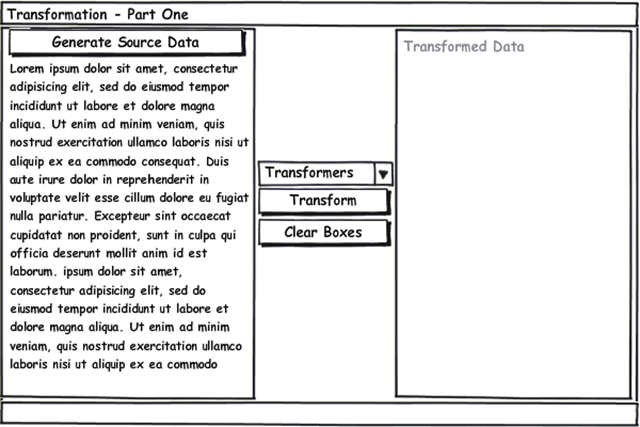
Part Two introduced MEF into the application. We covered the basic elements of MEF: Exports, Imports, Catalogs, and Containers. We decorated our implementations with Export attributes, and built an Assembly catalog to find find them all. We modified our targets with the Import attributes, and finally used the CompositionContainer to compose our final instance.

Breaking Up Is Not So Hard To Do

To demonstrate how MEF composes across assemblies, we need some assemblies to work with. So lets partition our current application into a three pieces. The first will be the application itself. So, lets cover the three parts, one at a time.

RealMEF Project

This project should be a Windows WPF Application. It should contain two files, App.xaml, and MainWindow.xaml (and their corresponding code-behind files).

App.xaml

1 <Application x:Class="RealMef.App" 2 xmlns="http://schemas.microsoft.com/winfx/2006/xaml/presentation" 3 xmlns:x="http://schemas.microsoft.com/winfx/2006/xaml" 4 StartupUri="MainWindow.xaml"> 5 <Application.Resources> 6 7 </Application.Resources> 8 </Application>

App.xaml.cs

1 /// <summary> 2 /// Interaction logic for App.xaml 3 /// </summary> 4 public partial class App : Application 5 { 6 }

MainWindow.xaml

1 <Window x:Class="RealMef.MainWindow" 2 xmlns="http://schemas.microsoft.com/winfx/2006/xaml/presentation" 3 xmlns:x="http://schemas.microsoft.com/winfx/2006/xaml" 4 Title="MainWindow" Height="531" Width="979"> 5 <Grid> 6 <Grid.RowDefinitions> 7 <RowDefinition Height="20"/> 8 <RowDefinition Height="*"/> 9 </Grid.RowDefinitions> 10 <Grid.ColumnDefinitions> 11 <ColumnDefinition Width=".40*"/> 12 <ColumnDefinition Width="200"/> 13 <ColumnDefinition Width=".40*"/> 14 </Grid.ColumnDefinitions> 15 16 <StackPanel Grid.Row="0" Grid.Column="0" Orientation="Horizontal"> 17 <TextBlock Name="txtGeneratorType" HorizontalAlignment="Left"/> 18 <Button Name="btnGenerate" Click="btnGenerate_Click" HorizontalAlignment="Right">Generate Source Data</Button> 19 </StackPanel> 20 <TextBox Grid.Row="1" Grid.Column="0" Name="txtSourceData" TextWrapping="Wrap"/> 21 <StackPanel Grid.Row="1" Grid.Column="1" VerticalAlignment="Center" Margin="5,0"> 22 <ComboBox Name="cbTransformationOptions"/> 23 <Button Name="btnTransform" Click="btnTransform_Click">Transform</Button> 24 <Button Name="btnClear" Click="btnClear_Click">Clear Boxes</Button> 25 </StackPanel> 26 <TextBlock Grid.Row="1" Grid.Column="2" Name="txtDestinationData" TextWrapping="Wrap" Background="LightGray" Foreground="Blue"/> 27 </Grid> 28 </Window>

MainWindow.xaml.cs

1 /// <summary> 2 /// Interaction logic for MainWindow.xaml 3 /// </summary> 4 public partial class MainWindow : Window 5 { 6 private readonly TranformationEngine _tranformationEngine; 7 public MainWindow() 8 { 9 // bootstrap MEF 10 // search the named assembly 11 //using (var catalog = new AssemblyCatalog(Assembly.LoadFile(System.IO.Path.GetFullPath("TransformationImplementation.dll")))) 12 // search the directory 13 using (var catalog = new DirectoryCatalog(".")) 14 { 15 var container = new CompositionContainer(catalog); 16 _tranformationEngine = new TranformationEngine(); 17 container.SatisfyImportsOnce(_tranformationEngine); 18 } 19 20 InitializeComponent(); 21 22 txtGeneratorType.Text = _tranformationEngine.Generator.Name; 23 cbTransformationOptions.ItemsSource = _tranformationEngine.Transformers; 24 cbTransformationOptions.DisplayMemberPath = "Name"; 25 cbTransformationOptions.SelectedIndex = 0; 26 } 27 28 private void btnGenerate_Click(object sender, RoutedEventArgs e) 29 { 30 txtSourceData.Text = _tranformationEngine.Generator.Generate(); 31 } 32 33 private void btnClear_Click(object sender, RoutedEventArgs e) 34 { 35 txtSourceData.Text = txtDestinationData.Text = string.Empty; 36 } 37 38 private void btnTransform_Click(object sender, RoutedEventArgs e) 39 { 40 var transformer = cbTransformationOptions.SelectedItem as ITransformer; 41 if (transformer != null) 42 { 43 txtDestinationData.Text = transformer.Transform(txtSourceData.Text); 44 } 45 } 46 }

Code Changes

The changes are minor, and limited to line 13. I changed the AssemblyCatalog to be a DirectoryCatalog. The DirectoryCatalog is used to tell MEF to load all assemblies in the current path. There is a second constructor override that takes the path and a search pattern, and loads all assemblies that match the search pattern in the specified path. However, for this use case, I am telling MEF to search for all assemblies (*.dll) in the current directory. That’s the extent of the changes for the main application.

TransformationEngine Project

This class library project contains the IGenerator and ITransformer interfaces, and the TransformationEngine class. Here is the code again.

IGenerator

1 [InheritedExport(typeof(IGenerator))] 2 public interface IGenerator 3 { 4 string Name { get; } 5 string Generate(); 6 }

ITransformer

1 [InheritedExport(typeof(ITransformer))] 2 public interface ITransformer 3 { 4 string Name { get; } 5 string Transform(string text); 6 }

TransformationEngine

1 public class TranformationEngine 2 { 3 [Import(typeof(IGenerator))] 4 public IGenerator Generator { get; set; } 5 [ImportMany(typeof(ITransformer))] 6 public IEnumerable<ITransformer> Transformers { get; set; } 7 }

This project defines the two interfaces that will be used by other types, and eventually imported into the TransformationEngine. Notice that I use the InheritedExport attribute on the interfaces. This attribute allows for derived types to be automatically tagged as an exported type. So your classes do not even have to be aware of MEF. Also notice that the Transformers property is decorated by the ImportManyAttribute. This allows for a collection of those types to be imported rather than just one. I covered both in Part Two, but wanted to highlight them again since they are so important.

Those three types are all that makes up this project. This type of project is sometimes referred to a Contracts Project, since it just exports (and imports) the contracts (decorated interfaces). The purpose of it is to define the types common to both the assembly that uses the types (RealMEF project) and assembly providing the implementations (TransformationImplementation Project – see below).

TransformationImplementation Project

This project is another class library project that contains the classes moved from the main application. Here is the code again.

LoremIpsumGenerator

1 public class LoremIpsumGenerator : IGenerator 2 { 3 #region Implementation of IGenerator 4 public string Name 5 { 6 get { return "Lorem Ipsum"; } 7 } 8 public string Generate() 9 { 10 return "Lorem ipsum dolor sit amet, consectetur adipiscing elit. Proin a metus commodo quam tincidunt imperdiet. Praesent quis consectetur nulla. Cras interdum imperdiet posuere. Vestibulum ante ipsum primis in faucibus orci luctus et ultrices posuere cubilia Curae; Donec hendrerit, erat et sollicitudin elementum, mi nulla aliquet nulla, ac fringilla nibh velit eget ipsum. Vivamus eget mi sed lacus ultrices convallis. Suspendisse fringilla pellentesque eros, at ultricies metus ultricies sed. Proin dolor dui, ultricies et blandit sit amet, gravida et purus. Proin magna dui, egestas ac imperdiet non, convallis sed nisi. Proin adipiscing hendrerit tortor commodo porta. Integer ullamcorper leo non odio condimentum ut sodales quam pellentesque. Phasellus quis quam quis enim pretium varius ac sit amet tellus. Donec dolor justo, tempor non pulvinar a, feugiat sed risus. Sed eget metus mauris." + 11 "Curabitur id pulvinar massa. Nam vel risus lectus, ut adipiscing quam. Mauris tincidunt massa in purus sagittis ullamcorper. Suspendisse posuere aliquam dolor ac posuere. Nulla interdum, erat a rutrum laoreet, purus neque rhoncus tellus, aliquam faucibus lacus justo eu ipsum. Vivamus bibendum est quis felis tempor ut convallis augue ultrices. Proin interdum fringilla sapien, nec tincidunt orci tempus sed. Integer eros dolor, fringilla id dictum at, adipiscing id purus. Vestibulum ullamcorper turpis quis massa feugiat non pharetra leo tempus. Cras et felis viverra nibh aliquet dapibus ac id ipsum." + 12 "Maecenas suscipit, leo ac cursus imperdiet, massa augue tincidunt purus, vel lacinia justo est id diam. Sed venenatis nisl non nibh vehicula id gravida metus imperdiet. Fusce euismod, eros et euismod ultricies, ipsum sem dapibus lacus, id ultricies nibh lacus porta est. Sed molestie fringilla metus vitae egestas. Vivamus at augue nibh, id volutpat nibh. Mauris tempus dapibus elementum. Sed volutpat aliquet augue id pretium. Donec consectetur eros id odio interdum lacinia. Suspendisse vitae lectus a sapien rhoncus varius vel consectetur tortor. Aenean id luctus libero. Praesent velit justo, tristique ac ultrices in, sollicitudin eu orci. Sed ornare ante sed libero volutpat tempus. Etiam vitae eros eu leo egestas sollicitudin. Integer pharetra interdum massa non condimentum. Sed augue sapien, eleifend sed ullamcorper id, elementum eget justo. Sed dignissim dictum tortor, quis feugiat lorem aliquet ac. Quisque vel elit ut libero sollicitudin accumsan. Aliquam bibendum sapien vitae tortor dapibus cursus non vitae nulla." + 13 "Cras semper fringilla odio id posuere. Duis nulla enim, gravida quis malesuada id, sollicitudin quis nisl. Curabitur tortor risus, iaculis a rhoncus sed, condimentum in ligula. Maecenas et magna in orci pulvinar euismod eu et odio. Cras sed tortor orci. Suspendisse porta neque vel purus eleifend rutrum. Pellentesque vel magna ac metus pulvinar tincidunt eu quis nunc. Vestibulum ligula purus, iaculis quis blandit ac, sodales et urna. Duis sodales ipsum quis magna vehicula non ornare lacus fringilla. Nulla neque erat, adipiscing at convallis sed, sodales eu ante. Curabitur quis aliquet mauris. Aliquam gravida augue et elit convallis a lobortis dui laoreet. Sed porta turpis vitae neque consequat at lacinia nibh pretium. Morbi pellentesque nulla id mauris consectetur ut malesuada mi viverra. Suspendisse vulputate lacinia imperdiet. Sed ultrices condimentum justo viverra condimentum. Morbi odio massa, convallis et sollicitudin vitae, fermentum eu magna. Nulla malesuada turpis a nisi semper sollicitudin. Morbi sed est lectus. Morbi auctor mollis pharetra." + 14 "Proin eleifend aliquam leo, quis vulputate tortor faucibus ac. Cras lobortis lacus felis. Curabitur eu erat nec odio euismod faucibus. Ut ut tortor turpis. Donec mattis posuere ipsum, a eleifend purus cursus ut. Suspendisse faucibus facilisis porta. Nulla id nulla sed quam placerat tincidunt. Phasellus elementum nulla ac ante feugiat varius. Aliquam eleifend, tellus in congue interdum, ipsum est porta lectus, ac ullamcorper magna nibh et tellus. Suspendisse eget tortor et ipsum vestibulum lacinia. Quisque sed leo nisl. Cras hendrerit, neque dictum suscipit fringilla, orci velit sollicitudin leo, in tincidunt tellus dolor eu purus. Nulla quis lacus ac diam tempus dapibus."; 15 } 16 #endregion 17 }

LowerCaseTransformer

1 public class LowerCaseTransformer : ITransformer 2 { 3 #region Implementation of ITransformer 4 public string Name 5 { 6 get { return "Lower Case Transformer"; } 7 } 8 public string Transform(string text) 9 { 10 return text.ToLower(); 11 } 12 #endregion 13 }

UpperCaseTransformer

1 public class UpperCaseTransformer : ITransformer 2 { 3 #region Implementation of ITransformer 4 public string Name 5 { 6 get { return "Upper Case Transformer"; } 7 } 8 public string Transform(string text) 9 { 10 return text.ToUpper(); 11 } 12 #endregion 13 }

These classes are the same as before, just in a new assembly all their own.

Building the Projects

Dependencies

The RealMEF project should have a dependency on the TransformationEngine project, but not the TransformationImplementation project. The TransformationImplementation project should also have a dependency on the TransformationEngine project, but not RealMEF. This will allow us to see what MEF can truly do for us.

Build the projects, and copy the TransformationImplementation assembly into the bin\debug or bin\release directory of the RealMEF project. Then run RealMEF. Everything should work – even though there is no defined linkage between the RealMEF project and your implementations.

Taking it to the Next Step

Modify the TransformationEngine class by changing the Import(typeof(IGenerator)) to Import(“StarWars”) and recompile. If you run your program now, it will fail. So, lets fix it.

Create a new class library project, I called it TransformationEx. Lets add two new implementations, just for the fun of it.

ReverseTransformer

1 public class ReverseTransformer : ITransformer 2 { 3 #region Implementation of ITransformer 4 public string Name 5 { 6 get { return "Reverse Transformer"; } 7 } 8 public string Transform(string text) 9 { 10 return new string(text.Reverse().ToArray()); 11 } 12 #endregion 13 }

StarWarsTextGenerator

1 [Export("StarWars", typeof(IGenerator))] 2 public class StarWarsTextGenerator : IGenerator 3 { 4 #region Implementation of IGenerator 5 public string Name 6 { 7 get { return "Star Wars Text Generator"; } 8 } 9 public string Generate() 10 { 11 return 12 "Don't underestimate the Force. I suggest you try it again, Luke. This time, let go your conscious self and act on instinct. Look, I can take you as far as Anchorhead. You can get a transport there to Mos Eisley or wherever you're going. Partially, but it also obeys your commands. No! Alderaan is peaceful. We have no weapons. You can't possibly" + 13 "You're all clear, kid. Let's blow this thing and go home! I find your lack of faith disturbing. The more you tighten your grip, Tarkin, the more star systems will slip through your fingers. What?! As you wish. I care. So, what do you think of her, Han?" + 14 "Hey, Luke! May the Force be with you. Obi-Wan is here. The Force is with him. I can't get involved! I've got work to do! It's not that I like the Empire, I hate it, but there's nothing I can do about it right now. It's such a long way from here. I have traced the Rebel spies to her. Now she is my only link to finding their secret base." + 15 "I'm surprised you had the courage to take the responsibility yourself. The Force is strong with this one. I have you now. But with the blast shield down, I can't even see! How am I supposed to fight? Ye-ha! Still, she's got a lot of spirit. I don't know, what do you think? Dantooine. They're on Dantooine." + 16 "I don't know what you're talking about. I am a member of the Imperial Senate on a diplomatic mission to Alderaan-- I need your help, Luke. She needs your help. I'm getting too old for this sort of thing. Oh God, my uncle. How am I ever gonna explain this? I call it luck. Remember, a Jedi can feel the Force flowing through him."; 17 } 18 #endregion 19 }

Line 1 contains the most interesting piece. I added the Export attribute, and specified a name for this export as well as the type. This will override the InheritedExport on the IGenerator type for this implementation only. You may notice that the text is the same I added to the Import attribute for the TransformationEngine above.

This project is similar to the TransformationImplementation project, so it depends only on the TransformationEngine project. Build it, and copy the assembly to the to RealMEF bin\debug or bin\release directory. Then run it. It all just works. That is the power of MEF. You just enhanced a pre-built project with new functionality very easily.

Summary

Take a look at how the ReverseTransformer implementation is now an available transformer, and it required no import or export changes. The StarWarsTextGenerator was different because I required only one, I did not implement any logic to pick the right one, and I wanted to demonstrate named import / exports. The way I dealt with the ReverseTransformer is more likely how you will deal with adding new functionality for your applications.

Over these three posts (Part One, Part Two, and this one), you have seen how to take a simple application, decompose it into MEF-able components, and further decompose into late-binding assemblies. While this does not cover the entirety of MEF, it gives you the knowledge needed to use the most commonly used functionality. So go decompose those monolithic applications and use MEF.

If you have done something cool with MEF, post it as a comment and share.


Kick It on DotNetKicks.com
Share this
1 Comment - Leave a comment
  1. Sambhaji says:

    I am facing one issue. Why RealMEF Project (which contains UI) does not build without following line..

    using System.ComponentModel.Composition;

    It gives error following error if we do not use above namespace.

    Argument 1: cannot convert from ‘TranformationEngine’ to ‘System.ComponentModel.Composition.Primitives.ComposablePart’

    But same code works if we use this namespace. I dont know the reason. Maybe I am missing something here..

Leave a comment

Your email address will not be published. Required fields are marked *

*


*

You may use these HTML tags and attributes: <a href="" title=""> <abbr title=""> <acronym title=""> <b> <blockquote cite=""> <cite> <code> <del datetime=""> <em> <i> <q cite=""> <strike> <strong>


Welcome , today is Saturday, May 19, 2012
Statistical data collected by Statpress SEOlution (blogcraft).