
At the Tampa C# Meetup on August 3rd, I presented this Gentle Introduction to MEF using the same project modified over three steps. This is part one, where I show the application without MEF.
Functionality
The target program will have the following functionality:
- Transform text data using a selectable transformation method
- Generate source data (in case the user is too lazy to type something in)
- Clear the source and destination text blocks
- Text generation and transformation must be pluggable strategies for future expansion
Text Generation Interface
public interface IGenerator { string Name { get; } string Generate(); }
This is the interface for my text generators. They exposed property, Name, will return the name of the implementation model. The exposed method, Generate, will return the generate text.
Text Generation Implementation
The text generation method for part one will insert a block of text that was originally generated from the Lorem Ipsum website when a button is clicked. Here is the code.
public class LoremIpsumGenerator : IGenerator { #region Implementation of IGenerator public string Name { get { return "Lorem Ipsum"; } } public string Generate() { return "Lorem ipsum dolor sit amet, consectetur adipiscing elit. Proin a metus commodo quam tincidunt imperdiet. Praesent quis consectetur nulla. Cras interdum imperdiet posuere. Vestibulum ante ipsum primis in faucibus orci luctus et ultrices posuere cubilia Curae; Donec hendrerit, erat et sollicitudin elementum, mi nulla aliquet nulla, ac fringilla nibh velit eget ipsum. Vivamus eget mi sed lacus ultrices convallis. Suspendisse fringilla pellentesque eros, at ultricies metus ultricies sed. Proin dolor dui, ultricies et blandit sit amet, gravida et purus. Proin magna dui, egestas ac imperdiet non, convallis sed nisi. Proin adipiscing hendrerit tortor commodo porta. Integer ullamcorper leo non odio condimentum ut sodales quam pellentesque. Phasellus quis quam quis enim pretium varius ac sit amet tellus. Donec dolor justo, tempor non pulvinar a, feugiat sed risus. Sed eget metus mauris." + "Curabitur id pulvinar massa. Nam vel risus lectus, ut adipiscing quam. Mauris tincidunt massa in purus sagittis ullamcorper. Suspendisse posuere aliquam dolor ac posuere. Nulla interdum, erat a rutrum laoreet, purus neque rhoncus tellus, aliquam faucibus lacus justo eu ipsum. Vivamus bibendum est quis felis tempor ut convallis augue ultrices. Proin interdum fringilla sapien, nec tincidunt orci tempus sed. Integer eros dolor, fringilla id dictum at, adipiscing id purus. Vestibulum ullamcorper turpis quis massa feugiat non pharetra leo tempus. Cras et felis viverra nibh aliquet dapibus ac id ipsum." + "Maecenas suscipit, leo ac cursus imperdiet, massa augue tincidunt purus, vel lacinia justo est id diam. Sed venenatis nisl non nibh vehicula id gravida metus imperdiet. Fusce euismod, eros et euismod ultricies, ipsum sem dapibus lacus, id ultricies nibh lacus porta est. Sed molestie fringilla metus vitae egestas. Vivamus at augue nibh, id volutpat nibh. Mauris tempus dapibus elementum. Sed volutpat aliquet augue id pretium. Donec consectetur eros id odio interdum lacinia. Suspendisse vitae lectus a sapien rhoncus varius vel consectetur tortor. Aenean id luctus libero. Praesent velit justo, tristique ac ultrices in, sollicitudin eu orci. Sed ornare ante sed libero volutpat tempus. Etiam vitae eros eu leo egestas sollicitudin. Integer pharetra interdum massa non condimentum. Sed augue sapien, eleifend sed ullamcorper id, elementum eget justo. Sed dignissim dictum tortor, quis feugiat lorem aliquet ac. Quisque vel elit ut libero sollicitudin accumsan. Aliquam bibendum sapien vitae tortor dapibus cursus non vitae nulla." + "Cras semper fringilla odio id posuere. Duis nulla enim, gravida quis malesuada id, sollicitudin quis nisl. Curabitur tortor risus, iaculis a rhoncus sed, condimentum in ligula. Maecenas et magna in orci pulvinar euismod eu et odio. Cras sed tortor orci. Suspendisse porta neque vel purus eleifend rutrum. Pellentesque vel magna ac metus pulvinar tincidunt eu quis nunc. Vestibulum ligula purus, iaculis quis blandit ac, sodales et urna. Duis sodales ipsum quis magna vehicula non ornare lacus fringilla. Nulla neque erat, adipiscing at convallis sed, sodales eu ante. Curabitur quis aliquet mauris. Aliquam gravida augue et elit convallis a lobortis dui laoreet. Sed porta turpis vitae neque consequat at lacinia nibh pretium. Morbi pellentesque nulla id mauris consectetur ut malesuada mi viverra. Suspendisse vulputate lacinia imperdiet. Sed ultrices condimentum justo viverra condimentum. Morbi odio massa, convallis et sollicitudin vitae, fermentum eu magna. Nulla malesuada turpis a nisi semper sollicitudin. Morbi sed est lectus. Morbi auctor mollis pharetra." + "Proin eleifend aliquam leo, quis vulputate tortor faucibus ac. Cras lobortis lacus felis. Curabitur eu erat nec odio euismod faucibus. Ut ut tortor turpis. Donec mattis posuere ipsum, a eleifend purus cursus ut. Suspendisse faucibus facilisis porta. Nulla id nulla sed quam placerat tincidunt. Phasellus elementum nulla ac ante feugiat varius. Aliquam eleifend, tellus in congue interdum, ipsum est porta lectus, ac ullamcorper magna nibh et tellus. Suspendisse eget tortor et ipsum vestibulum lacinia. Quisque sed leo nisl. Cras hendrerit, neque dictum suscipit fringilla, orci velit sollicitudin leo, in tincidunt tellus dolor eu purus. Nulla quis lacus ac diam tempus dapibus."; } #endregion }
Transformation Interface
public interface ITransformer { string Name { get; } string Transform(string text); }
The transformation interface is another simple one. The exposed property returns the name of the implementation. The exposed method takes the source text and returns the transformed text.
Transformation Implementations
I have implemented two different transformers with this sample. The first does a lower case transformation, and second an upper case transformation. Here is the code.
public class LowerCaseTransformer : ITransformer { #region Implementation of ITransformer public string Name { get { return "Lower Case Transformer"; } } public string Transform(string text) { return text.ToLower(); } #endregion }
public class UpperCaseTransformer : ITransformer { #region Implementation of ITransformer public string Name { get { return "Upper Case Transformer"; } } public string Transform(string text) { return text.ToUpper(); } #endregion }
In both cases, these are simple pass through methods to String.ToLower() or String.ToUpper().
Transformation Engine
The glue that ties all this grand functionality together is a composition class creatively titled TransformationEnginer. Here is that code.
public class TranformationEngine { public IGenerator Generator { get; set; } public ICollection<ITransformer> Transformers { get; set; } }
This class holds the reference to the single IGenerator we are using, and the collection of ITransformers.
Wiring it All Up
We now have all our functionality, so lets wire it up, but first, lets see what the user interface for so complex a project will be.
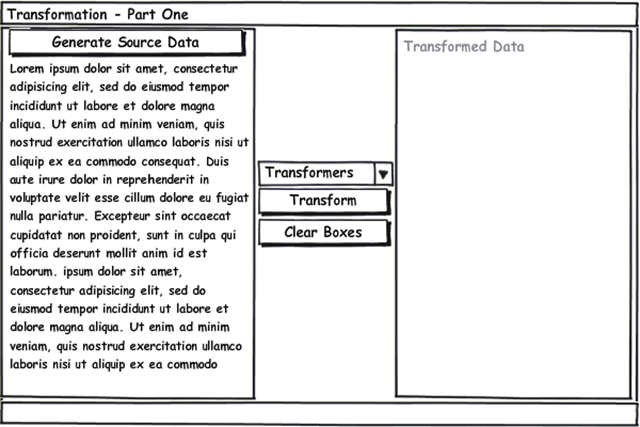
Good. Now you know what it will look like, so lets do the set up. Here is the code for the single field we need and the constructor for MainWindow class. I have added line number so I can refer to specific lines below.
1 private readonly TranformationEngine _tranformationEngine; 2 public MainWindow() 3 { 4 _tranformationEngine = new TranformationEngine 5 { 6 Generator = new LoremIpsumGenerator(), 7 Transformers = new ITransformer[] {new LowerCaseTransformer(), new UpperCaseTransformer()} 8 }; 9 InitializeComponent(); 10 11 cbTransformationOptions.ItemsSource = _tranformationEngine.Transformers; 12 cbTransformationOptions.DisplayMemberPath = "Name"; 13 cbTransformationOptions.SelectedIndex = 0; 14 } 15
Line 4 creates our TransformationEngine, and initializes with the LoremIpsumGenerator, the LowerCaseTransformer, and the UpperCaseTransformer.
Line 11 sets the combo box ItemsSource property to the list of transformers.
Line 12 tells the combo box to use the Name property on the items referred to in the ItemsSource collection.
Line 13 tells the combo box to select the first item in the list.
I have also wired up some events in the XAML to handle the button clicks and we will cover that code in a moment, but at this point, our user interface will display our transformers, allow us to select one.
Handling Events
1 private void btnGenerate_Click(object sender, RoutedEventArgs e) 2 { 3 txtSourceData.Text = _tranformationEngine.Generator.Generate(); 4 } 5 6 private void btnClear_Click(object sender, RoutedEventArgs e) 7 { 8 txtSourceData.Text = txtDestinationData.Text = string.Empty; 9 } 10 11 private void btnTransform_Click(object sender, RoutedEventArgs e) 12 { 13 var transformer = cbTransformationOptions.SelectedItem as ITransformer; 14 if (transformer != null) 15 { 16 txtDestinationData.Text = transformer.Transform(txtSourceData.Text); 17 } 18 }
The three methods above handle the events and control the transformation.
The btnGenerate_Click method calls the Generate method on the generator exposed by the transformation engine, and stores the result in the text property of the source data control.
The btnClear_Click method sets both the source and destination data text properties to string.Empty in order to clear the text blocks.
The btnTransform_Click method finds the selected transformer from the combo box (remember how we set the transformers collections to the ItemsSource property in the constructor?). Then it calls the Transform method, passing in the source data text property, and setting the destination data text property to the return value.
Summary
This program is a very contrived example of how many programs implement simple decoupling of functionality, and the selection of an execution strategy (see Strategy Pattern). So where is the MEF? Well that is coming in Part Two. First I wanted to show how the program without all the MEF goodness to come. Stay tuned for the next two parts. In Part Two I will change this program to use MEF to do the wiring up we did in the constructor. In Part Three we will break this program up across multiple assemblies to show how we can assemble the the programs functionality at run time.

[...] same project modified over three steps. This is Part Two, where I show the application created in Part One using [...]
[...] http://buksbaum.us/2011/08/20/gentle-introduction-to-mefpart-one/ [...]
[...] project modified over three steps. This is Part Three, where I complete the application created in Part One and modified to use MEF in Part Two. This part will show MEF composing the application from [...]